Table of Contents
Your laptop is not just a gadget; it is your classroom, your library, and everything social. Moreover, your life consists of screens, from group project chats to late-night research. That sounds great, but every click, download, and login that you make is tracked. Also, in our hyper-connected world, that trail can be followed back to people you would never want to meet.
Cybersecurity can often be overlooked by most people, but to students, it is just as mandatory as bringing their student ID. Because a weak password can unlock your inbox, your homework or even access to the bank. So, the threats are there, but what are the ways to beat them? What are some cybersecurity tips for students in the digital age? So, here in this blog by All Assignment Help, we will guide with simple yet student-friendly tips on how to protect your digital life.
Why is Cybersecurity Important for Students?
Cybersecurity is also related to other aspects of life, such as academic success or personal safety from network attacks.
- From personal social insurance numbers to research or financial stuff on university portals, cloud storage, and email accounts can have important data about us that should be protected with access.
- But if this information makes it out, the consequences may be identity theft and job loss and financial fraud.
- Students, who are usually working multiple jobs and have tighter finances, are a massive target for cybercriminals. Which means, students will be more likely to click the fictitious link or a password that is not convenient.
- Just think about how tragic it would be to write a ten-thousand-word research paper, just for someone to hold it ransom for crypto!
- It stems far beyond personal inconvenience. Compromised credentials can sometimes have severe consequences, such as facing plagiarism allegations or missing article submission dates, which will affect students’ reputations within academia.
That is why it is no longer a choice for ordinary people to know basic cybersecurity. Thus, you are protecting your data and reinforcing the credibility of your future academic and job opportunities. Also, if you need academic help, such as online assignment help, make sure it’s authentic.
Also read: Cybersecurity vs Software Development: Understanding the Differences
Common Cyber Threats Students Face
In this digital space, a plethora of threats in the guise of mundane things pose a threat to struggle against security. Recognising these threats is the first step to staying safe.
Phishing and email scams
Most of the time, phishing attacks arrive in your inbox looking like official emails from your university, scholarship organisations or even from well-recognised online platforms. One such scam is phishing emails baiting you to click on harmful links or provide login information. For example, a fake notice of your “exam schedule.”
Malware and ransomware
This can occur when you download any pirated software, different free tools online that are supplied free by unverified sources or attachments from unknown senders. Malware can allow someone to steal your data, and ransomware can encrypt all your files until a fee is paid.
Identity theft
Posting personal information on social media or websites with no secure protocols can result in identity theft. Your details can then be used for all manner of fraudulent account creations or to clean out your wallet.
Social engineering attacks
These are all forms of emotional manipulation used to create a connection between you and the scammer, making them seem like a friend, a classmate or in some cases, desperate situations where people pretend to be tech support. For example, if a student tries to find online class help, they should always be careful and look for credible offers which have all the necessary certifications, use safe payment systems, and do not require more information than necessary.
Wi-Fi exploits
A hacker can access your data easily while you are in a cafe, library or campus, even over their public Wi-Fi network, more so when you log into one of your accounts without an appropriate encryption to make a payment.
This helps you know the threats so you can act in a way that will protect your studies, personal information and digital identity. These are some of the cybersecurity tips for students, which will help them in the long run.
Also read: How to Write a Cybersecurity Research Paper – The Ultimate Guide for 2025
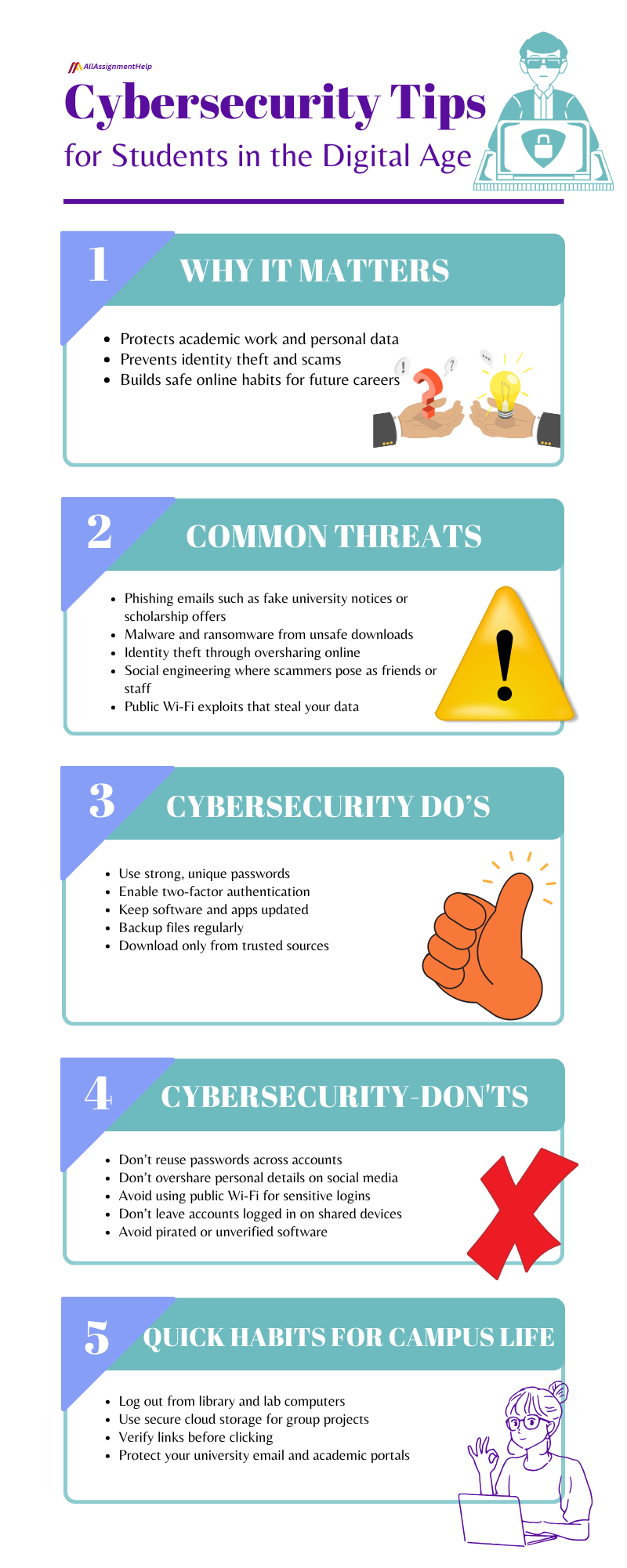
Cybersecurity Tips for Students in the Digital Age
With the complexity of cyber threats, cybersecurity seems impossible! Yet some trivial behaviours will drastically lessen the unequivocal possibility of becoming a victim. Simple cybersecurity tips for students can save your data, assignments, and even your online identity.
Create strong and unique passwords
- Never use your name, DOB or a basic run sequence of numbers like 123456.
- For optimum security, use a mix of upper and lowercase letters, numbers, and symbols in your password.
- You can also use sentences which are effectively passphrases or randomly combined words.
- Avoid using the same password for university portals or email sites.
Enable two-factor authentication
Even though two-factor authentication does not prevent hackers from getting your password, it makes it more difficult for them to access because an additional step is needed in the login process. Most educational platforms and cloud storage services will provide this service for free.
Be cautious with public Wi-Fi.
- Public networks are unsafe.
- Encrypt your connection with a Virtual Private Network (VPN).
- If you tend to be on the internet a lot and have accounts that contain sensitive information like PayPal, Apple Pay, etc., avoid using them on open networks.
Recognise phishing attempts
If you get an urgent email asking you to click on any links or provide information about yourself, just STOP and double-check WHO sent it. Hover over links with your mouse to verify before clicking, and never download attachments from unfamiliar sources. Also, those students who need assistance with subjects like information systems homework help have repeatedly been advised to beware of such deals with some unprecedented academic service providers. Doing this will usually prevent the illegitimate use of any logins and documents you provide.
Keep software and devices updated.
Older software programs often provide cyberattackers with an easy way in. Keep your operating system, antivirus, and all your applications up to date with the latest security vulnerability patches.
Limit personal information sharing online.
Posting your location, student ID number, and schedule on social media can lead to scams or identity theft.
Back up important data
Always save university work, notes, or research to the cloud and an external hard drive. This means you are secure and will never lose work to hardware failure, hacking, or ransomware.
Always download apps and files from authentic sources.
Download software from official app stores and trusted websites. This is particularly essential for students specialising in technical fields. For example, people pursuing computer engineering assignment help projects need software programs that can be used only when downloaded from authorised sites. Downloading them from unauthorised sources means a high likelihood of malware attacks and so on.
Stay informed about new threats.
Cyber threats evolve quickly. Stay informed through your campus IT department, cybersecurity blogs or workshops. This informs you to modify your routine before an attack occurs.
When you perform these habits with continuity, you have much less influence for a cybercriminal to matter what its agenda or level of skill. Cybersecurity is not alarmist; it is common sense and good practice to protect your work in coursework, academic progress, and personal information. So, try hitting the right note and follow these cybersecurity tips for students to avoid falling for a digital danger.
Cybersecurity Habits for Academic and Campus Life
Academic lives of people are often spent transitioning from campus labs, personal devices, or shared networks, all come with their cybersecurity vulnerabilities.
- Be sure to log off on public terminals or refuse to save your password on computers.
- Use strong passwords and two-factor authentication for university portals. Do it even on your laptop.
- Only let trustworthy people access what you are working on in group work, and keep it in a safe cloud space.
- Do not fall for suspicious links put in group chats or project boards that can easily contain harmful viruses.
Nowadays, students have a blend of physical and virtual classes while accessing their assignments, grades and lecture recordings through online portals. Countless times, they require extra educational support with their queries, such as how to do my online exam, manage my online class, etc. So, whether you are trying to manage your time or get support that could help to meet the required tasks, keep all logins safe, and have every device you use cleaned properly. Adopting these cybersecurity tips for students is going to help you lower the chances of being exposed online. It also provides a secure and non-stalled path in your academic journey.
Final Checklist: Student Cybersecurity Do’s and Don’ts
Do’s
- Create complex and unique passwords for every account.
- Enable two-factor authentication wherever possible.
- Regularly update software, applications, and devices.
- Back up important files regularly.
- Check the source before downloading files and clicking on links online.
Don’ts
- If you have not ponied up for a VPN, do not even consider conducting sensitive tasks over public Wi-Fi.
- Avoid sharing too much personal information on social media.
- Never log into shared devices or public accounts.
- Avoid the repeated use of passwords across multiple platforms.
- Never download unauthorised software or apps.
By following a few simple rules daily, your work and personal data can be kept safe from unwanted individuals.
Conclusion
Students are dependent on digital tools for studying or anything these days. Therefore, simple steps such as having strong password usage, not clicking on links from emails that look suspicious and locking devices will greatly improve the security of personal and academic information. Adopt such a smart online habit now, and you safeguard your study as well as build up marketable skills that will be valuable for life.
Frequently Asked Questions
Question: Why is cybersecurity important for students?
Answer: It ensures that the important academic work will remain untouched, and their personal information will not be misused.
Question: What are the biggest cybersecurity risks that students encounter?
Answer: Phishing scams, malware and ransomware, identity theft and social engineering all target students.
Question: How can students stay safe on public Wi-Fi?
Answer: VPN, and refrain from logging into any sensitive accounts or using file sharing when you are on a public network
Question: What steps should students take to help increase cybersecurity?
Answer: Start using proper, distinct passwords and two-factor authentication for all your key accounts.