Tools And Resources For Excelling In Online Classes

What this article will help you understand
This blog explores essential tools and resources for excelling in online classes, including time-management apps, learning management systems, note-taking tools, research databases, virtual labs, tutoring services, and digital textbooks. It also shares practical tips to help students organize coursework, manage deadlines, stay focused, access reliable study materials, and improve their overall online learning experience.
- Use time-management tools like Todoist and Trello to organize coursework and track deadlines.
- Learn your LMS to access course materials, assignments, grades, and announcements.
- Use digital note-taking apps to organize lecture notes and simplify revision.
- Explore academic databases, virtual labs, and tutoring resources to strengthen subject knowledge.
What are you trying to do with this topic?
Choose the closest task and the page will point you towards a useful next step.
Start with the central concept and the terminology used in the article.
Open the closest route ↗Connect the explanation to the question, learning outcomes and marking criteria.
Open the closest route ↗Review evidence, structure, referencing and the exact submission requirements.
Open the closest route ↗Do you have enough information to begin?
Select what you already have. Nothing is submitted from this checklist.
When these details are together, the requirement can be reviewed in context.
Online Class Help ↗Table of Contents
It used to be nearly impossible for students to attend college, work a full-time job, and take care of their families. However, the advent of online education has altered this, enabling millions of people to reach what they had once considered impossible.
Online education offers convenience and flexibility, but it also necessitates discipline—possibly even more than on-campus courses. How come? Since, the ease with which one might allow other problems to prevent one from signing in and completing the task at hand.
It doesn’t matter if you are a full-time student, a working professional looking to upgrade your skills, or just someone who loves learning forever as we have the Internet and the digital world of opportunities is all around. On the other hand, having suitable and relevant online tools and resources would help you achieve better performance in online studies. This blog which is curated by the expert at allassignmenthelp will explore the tools that can help students to be more productive.
How to Choose the Right Online Learning Tools
Before signing up for an app, identify the problem you want to solve. A planner will not explain a difficult concept, and a research database will not automatically manage your deadlines. Match each tool to a specific learning need.
- Check your school’s existing resources: Your institution may already provide an LMS, video-conferencing software, cloud storage, library databases, or accessibility tools.
- Compare ease of use and access: Look for tools that work on your devices and fit your budget. Check whether a stable internet connection is required.
- Review privacy and security: Avoid uploading grades, student IDs, private course materials, or personal information to services unless you understand their privacy terms and have permission.
- Choose a small toolkit: One calendar, one task manager, one note-taking system, and a few subject-specific resources are often enough.
- Check academic rules: Follow your institution’s policies on AI tools, collaboration, tutoring, citations, and permitted assistance.
Before choosing an online learning tool, identify the challenges you need to address. A planner can help you track deadlines, while note-taking apps and research databases can support your studies. If you are struggling to balance coursework, assignments, and exams, consider using tools that improve organization and time management. Students who need additional academic support can also explore legitimate tutoring and study assistance options, including services related to the search term pay someone to take my online class for me, while ensuring that any assistance complies with their institution’s academic integrity policies.
Also Read: A Clear Checklist for Choosing an Online Course
Top 9 Tools And Resources For Excelling In Online Classes
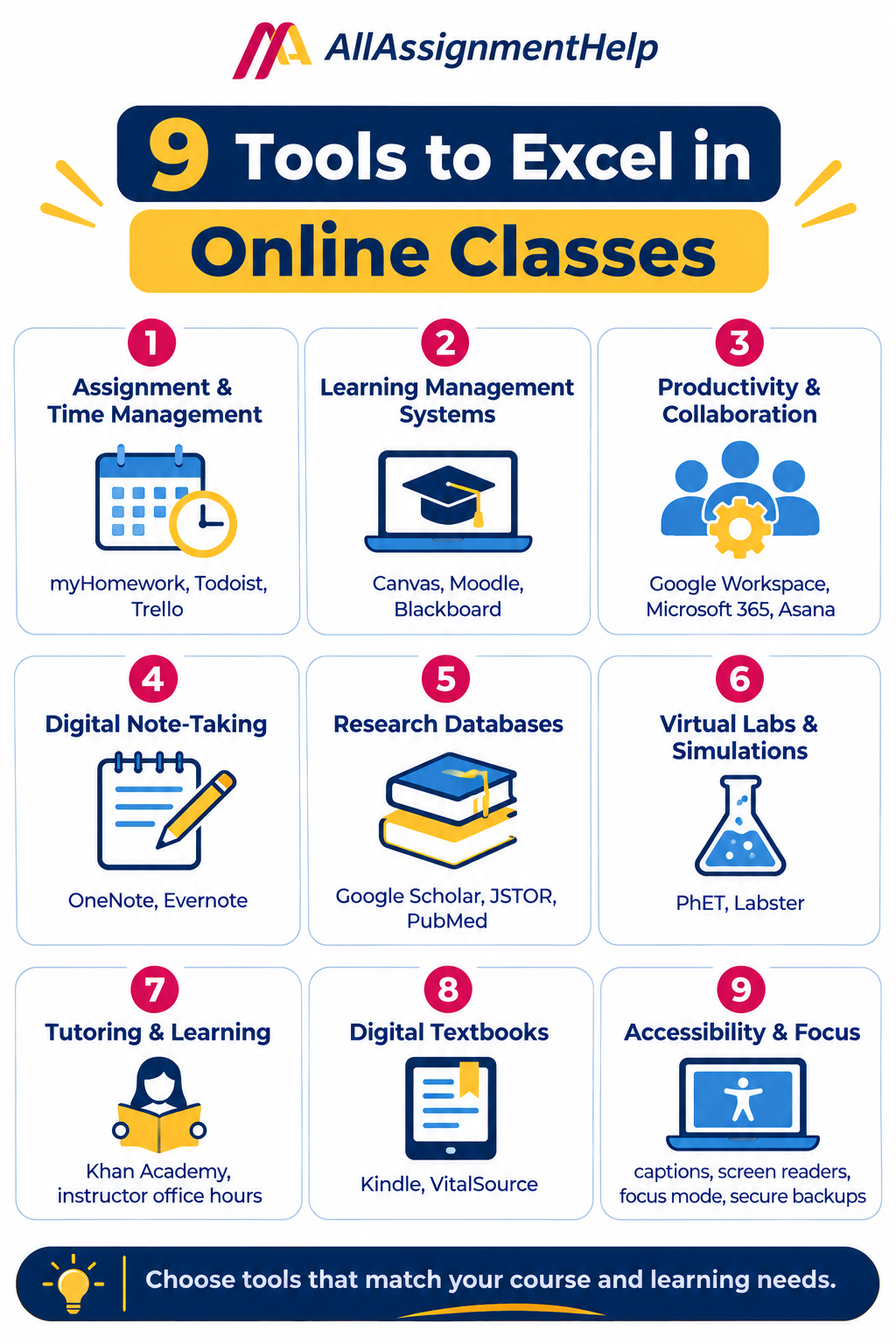
1. Assignment and Time-Management Tools
A clear planning system helps you see what is due, estimate the time each task needs, and start before a deadline becomes urgent.
myHomework
myHomework is a student planner for tracking classes, assignments, due dates, and reminders. It can be useful if you prefer an academic planner rather than a general to-do list. Check the current feature list and device compatibility before choosing a plan.
Best for: students who want to keep class schedules and assignment deadlines together.
Todoist
Todoist helps organize tasks into projects and set due dates or priorities. You can create separate projects for courses, then break large assignments into smaller actions such as selecting a topic, finding sources, outlining, drafting, and proofreading.
Best for: students balancing coursework with work, family responsibilities, or other commitments.
Trello
Trello uses boards, lists, and cards to make progress visible. For example, create lists called “To Do,” “In Progress,” “Waiting for Feedback,” and “Completed.” Add one card for each assignment or project and include its deadline, checklist, and relevant files.
Best for: group projects, long assignments, and tasks with multiple stages.
Even with the right planning tools, some students may struggle with complex topics, tight deadlines, or multiple assignments due at once. In such situations, seeking last-minute assignment help from a qualified tutor or academic support service can help students clarify difficult concepts, review their work, and improve their understanding of the subject. Combine expert guidance with time-management tools to stay organized and complete your coursework more confidently.
How to use a planner effectively
- Enter every exam, assignment, discussion post, and project deadline from your course syllabus.
- Break large tasks into steps that can be completed in manageable study sessions.
- Set a reminder before the actual deadline so you have time to review your work.
- Review the next seven days at the start of each week and update your plan when priorities change.
Read More: Smart Reads for Students: Warren Buffett Book Recommendations
2. Learning Management Systems (LMS)
A learning management system is the online hub an institution uses to deliver course materials, share announcements, collect assignments, and communicate with students. Common examples include Canvas, Moodle, and Blackboard. Your school may use a different platform.
Learn how to find the syllabus, module pages, instructor announcements, grades, assignment rubrics, discussion boards, and submission receipts. Turn on notifications that matter, but check the LMS directly because email alerts can be delayed or missed.
Also Read: Top LMS Platforms Used in Online Courses in 2026
3. Productivity and Collaboration Tools
Google Workspace
Google Docs, Sheets, Slides, and Drive can help students write, analyze data, prepare presentations, and collaborate on shared files. Version history and comments can make it easier to review changes and coordinate group work. Access and features may depend on your account or institution.
Microsoft 365
Microsoft Word, Excel, PowerPoint, and OneDrive support document writing, spreadsheets, presentations, and file storage. These tools are especially useful when a course requires specific file formats or advanced spreadsheet features. Check whether your school provides a license.
Asana and similar project-management tools
Project-management tools can help groups assign responsibilities, set milestones, and monitor progress. Before using one for a class project, agree on who owns each task, when drafts are due, and how the group will communicate.
Best for: collaborative assignments, presentations, and projects with several contributors.
4. Digital Note-Taking Apps
Microsoft OneNote
OneNote lets students organize notes into notebooks and sections. You can create a section for each course, record key ideas from lectures, and add questions to revisit. Use headings and a consistent naming system so information remains easy to find.
Evernote
Evernote can be used to collect notes and reference material in one searchable workspace. Review current plan limits, syncing options, and device support before relying on it for all your coursework.
A Note-Taking Method That Works
- Record the main idea, supporting details, examples, and questions rather than trying to transcribe every word.
- After class, write a short summary in your own words.
- Link notes to the relevant reading, lecture, or assignment.
- Review notes regularly and turn important concepts into practice questions or flashcards.
Best for: Students who need a consistent way to organize lecture notes, readings, and revision material.
5. Online Libraries and Research Databases
Academic databases can help you find credible material for essays, reports, and research projects. Start with your institution’s library portal when possible; it may provide access to journals and books that otherwise require payment.
Google Scholar
Google Scholar searches scholarly literature across disciplines, including articles, theses, books, abstracts, and court opinions. Use it to discover relevant research, follow citations, and locate versions of a paper. Always check the author, publication venue, date, methods, and relevance before citing a result.
JSTOR
JSTOR provides access to scholarly journals, books, primary sources, and other academic materials, with availability depending on the content and access route. It is particularly useful for research in the humanities, arts, and social sciences.
PubMed
PubMed is a resource for searching biomedical and life-sciences literature. It is useful for health-related research, but a search result or abstract alone does not establish that a claim is reliable. Read the study carefully and consider its methods, limitations, and publication date.
Tips for Finding Reliable Academic Sources
- Use specific search terms and synonyms rather than a full question alone.
- Prefer peer-reviewed research, academic books, official data, and primary sources when appropriate for the assignment.
- Check publication dates when the topic changes quickly.
- Read beyond the abstract and distinguish the study’s findings from its authors’ interpretation.
- Record citation details as you research and follow the citation style required by your instructor.
Best for: Essays, literature reviews, research papers, and evidence-based assignments.
6. Virtual Labs and Interactive Simulations
Virtual laboratories and simulations let students explore scientific or mathematical concepts through interactive models. They can help demonstrate processes that are difficult to observe directly, but they may not replace hands-on lab work when a course requires physical experimentation.
PhET Interactive Simulations
PhET, developed at the University of Colorado Boulder, offers interactive simulations for topics across physics, chemistry, biology, earth science, and mathematics. Use the simulation alongside your course materials and write down what changes when you adjust a variable.
Labster
Labster offers virtual laboratory simulations designed for science education. Access and available simulations may depend on your school or subscription, so check with your instructor or library.
Best for: Students who need additional visual or interactive practice with scientific concepts. Follow your course’s lab instructions and do not treat a simulation as a substitute for required practical work.
7. Tutoring and Subject-Learning Resources
Khan Academy
Khan Academy offers instructional content and practice in areas such as mathematics, science, and other school subjects. It can be useful when you need to review a prerequisite concept, work through examples, or practice a skill at your own pace.
Instructor Office Hours and Campus Tutoring
Your instructor, teaching assistant, writing center, math center, or university tutoring service may be able to explain course-specific expectations. Bring a clear question, your attempt so far, and the point where you became stuck. This makes a support session more productive.
Study Groups and Peer Discussion
Small study groups can help you compare interpretations, explain concepts aloud, and prepare for exams. Set a clear goal for each session and follow your institution’s rules on collaboration. Each student should complete and understand their own assessed work.
Best for: Clarifying concepts, practicing problem-solving, and receiving feedback. Check the availability, costs, and scope of any external tutoring service before using it.
8. Digital Textbooks and E-books
Kindle
Kindle apps and devices let readers access compatible e-books and highlight or search text. Availability, rental options, and prices vary by title and region.
VitalSource
VitalSource provides digital textbooks from participating publishers. Depending on the title and access arrangement, students may be able to search, highlight, or annotate their books. Check whether the required textbook is available through your institution.
How to Choose the Right Digital Textbook
Before buying a digital textbook, compare the edition, ISBN, access duration, and required features with the syllabus. A cheaper edition may not match the assigned readings or page references.
For students taking online math courses, digital textbooks can provide searchable formulas, worked examples, and practice problems. However, keeping up with textbook readings, assignments, and weekly lessons can still be challenging. Students searching for “take my math class for me” may be looking for additional support with demanding coursework. Online math tutoring and guided problem-solving resources can help them understand difficult concepts, practice essential skills, and manage their coursework more effectively.
9. Accessibility, Focus, and Technical Tools
Online learning also depends on being able to access course content comfortably and reliably. The most useful support tools vary by student, device, and institution.
Accessibility Features
Built-in screen readers, captions, speech-to-text, text enlargement, and keyboard navigation can make digital materials easier to use. Ask your institution’s accessibility office about approved accommodations.
Focus Tools
Use your device’s focus mode or a simple timer to reduce interruptions during study sessions. Schedule short breaks and silence nonessential notifications.
Internet Backup
Download permitted readings in advance, keep your device charged, and know how to contact your instructor if a connection failure affects attendance or submission.
File Organization
Use clear filenames such as Course_Assignment_Draft_Date and keep backups of important work.
Online Security
Use strong, unique passwords and multi-factor authentication where available. Avoid sharing account credentials or installing untrusted software advertised as a shortcut to course access.
A Simple Workflow for Using Online Class Tools
You can make these resources work together without creating a complicated system. Try this weekly routine:
Step 1: Check the LMS
Review announcements, readings, grading criteria, and all upcoming deadlines.
Step 2: Update Your Planner
Add due dates and divide large assignments into smaller steps.
Step 3: Study and Take Notes
Use your preferred note-taking app, then write a short summary after each lecture.
Step 4: Research Carefully
Use your library and suitable databases. Save citation details as you go.
Step 5: Practice Difficult Concepts
Use course exercises, tutoring, or relevant simulations to identify gaps in understanding.
Step 6: Review Your Progress
At the end of the week, mark completed tasks, reschedule unfinished work, and plan the next week.
Step 7: Keep Your System Simple
If an app adds more work than it saves, replace it with a tool you already use.
Also Read: How to Manage Online Exam Fear Before and During the Test
Common Mistakes to Avoid When Using Online Study Tools
Downloading Too Many Apps
Spending more time organizing apps than learning can reduce productivity. Choose a few tools that meet your needs.
Trusting Search Results Without Verification
Check the source’s credibility and read the full material before using it in academic work.
Relying Only on Reminders
Reminders help you stay organized, but they do not replace checking the official LMS and syllabus.
Ignoring Collaboration and Privacy Rules
Set clear responsibilities when using shared documents, protect private information, and follow your institution’s collaboration policies.
Replacing Required Practical Work With Simulations
A virtual simulation may support learning, but it might not meet your course’s hands-on laboratory requirements.
Paying for Tools Without Comparing Options
Check free alternatives, institutional access, device compatibility, subscription limits, and cancellation terms before purchasing a tool.
Conclusion: Build a Toolkit Around Your Learning Needs
The best tools and resources for online classes are the ones that help you learn consistently. A planner can keep deadlines visible, an LMS can centralize course information, note-taking apps can organize ideas, and academic databases can strengthen research. Virtual labs, tutoring, and digital textbooks can provide additional support when your course requires them.
Start with one tool for planning, one for notes, and the resources recommended by your instructor. Review your setup after a few weeks and keep only what genuinely helps you study, understand the material, and submit your own work on time.
FAQs
What are the best tools for online classes?
The best tools depend on your needs. Use myHomework or Todoist to track deadlines, Trello to manage projects, your school’s LMS to access course materials, OneNote or Evernote to take notes, Google Scholar or JSTOR to find research, and Khan Academy or PhET for additional practice.
Which free tools can help students manage online classes?
Students can use free task planners, note-taking apps, office software, and learning resources. Khan Academy and PhET offer free learning materials, while other tools may have feature limits or require institutional access. Check the current terms before signing up.
How can I manage time effectively in online classes?
Add every deadline to one planner, break large assignments into smaller tasks, schedule dedicated study sessions, and set reminders before due dates. Review your upcoming week regularly and use your course LMS as the official source for assignment requirements.
What is an LMS, and why do online students need it?
A learning management system (LMS) is a platform that helps students access course materials, announcements, assignments, grades, and discussions. Learning how to navigate your institution’s LMS makes it easier to follow instructions, track progress, and meet deadlines.
Which app is best for tracking assignments?
myHomework is designed for student planning, Todoist helps organize tasks and projects, and Trello uses boards and cards to track progress. The best option is one that suits your workflow and allows you to manage deadlines consistently.
What is the difference between a planner and a project-management tool?
A planner focuses on schedules, daily tasks, and deadlines. A project-management tool helps divide larger projects into stages, assign responsibilities, and monitor progress. Some applications offer both features, making them useful for managing coursework and group assignments.
Which tools are useful for taking notes in online classes?
OneNote and Evernote are popular digital note-taking options. Students can also use school-approved document applications to organize their notes. Create separate sections for each course, summarize important concepts in your own words, and record questions for later review.
Where can I find credible sources for online assignments?
Start with your institution’s library for access to academic books, journals, and research databases. Google Scholar helps discover scholarly literature, JSTOR provides academic publications and primary sources, and PubMed is useful for biomedical research. Evaluate the credibility of each source and follow your instructor’s citation guidelines.
Is Google Scholar a peer-reviewed database?
No. Google Scholar is a search tool for scholarly literature, not a database that guarantees every result has undergone peer review. Before citing a source, check its publisher, author credentials, publication type, and research quality.
Are virtual labs enough for science courses?
Virtual labs can help students understand scientific processes, conduct simulations, and practise applying concepts. However, they may not replace hands-on laboratory sessions required by a course. Always follow your syllabus and instructor’s instructions.
How can I get help if I do not understand an online lesson?
Review the lecture and assigned readings, identify the exact concept causing difficulty, and ask your instructor, teaching assistant, campus tutor, or study group for clarification. Resources such as Khan Academy can also help you review foundational concepts and practise relevant skills.
How do I choose between a digital textbook and a printed textbook?
Compare the cost, required edition, access duration, search functionality, annotation options, screen comfort, and offline availability. Choose the format that suits your learning preferences while meeting your course requirements.
How can I stay focused during online classes?
Choose a consistent study location, silence unnecessary notifications, and keep only relevant browser tabs open. Divide your work into manageable sessions with short breaks, and set a specific learning goal before each session to stay on track.
What should I do if my internet connection fails during an online class?
Switch to an approved backup connection if available, use previously downloaded course materials, and inform your instructor as soon as possible. Keep a record of any failed submission and follow your institution’s policies for missed classes, technical problems, and deadline extensions.
Are online study tools safe to use?
Online study tools can be helpful, but review their privacy policies and permissions before sharing personal information or course files. Use strong passwords, enable multi-factor authentication where available, and follow your institution’s technology and data-protection policies.
Do I need to pay for online learning tools?
No. Many tools offer free plans, open educational resources, or access through educational institutions. Check feature limits before subscribing, and avoid paying for multiple applications that provide the same functionality.
Can AI tools help with online classes?
AI tools can help students brainstorm revision questions, understand difficult concepts, summarize permitted study materials, and organize study schedules. However, verify important information against course materials and credible sources. Protect personal information, follow your institution’s AI policy, and disclose AI assistance when required. Never submit prohibited AI-generated work as your own.
How many study apps should I use at once?
There is no fixed number, but a small set of tools is easier to manage. Most students can begin with a planner, a note-taking app, their institution’s LMS, and relevant subject-learning resources. Add more applications only when they solve a specific problem.
How can I collaborate on group assignments online?
Start by agreeing on individual responsibilities, milestones, deadlines, file-sharing methods, and communication expectations. Use shared documents or project-management boards when permitted, document important decisions, and ensure every group member understands the final submission requirements.
What is the easiest way to prepare for an online exam?
Start by reviewing the exam format, syllabus, and topics provided by your instructor. Create a revision schedule, practise active recall, solve practice questions, and review your mistakes. Test your internet connection and exam software in advance, and follow all examination rules.
What this article covers
This blog focuses on tools and resources that help students manage online classes, organize coursework, conduct research, take notes, and improve study habits. It provides practical examples of popular learning platforms and productivity apps. However, tool features, pricing, and availability may change over time. Students should verify current details, check institutional access, and follow their course guidelines when selecting and using these resources.
Terms used in this guide
- Learning Management System (LMS): A platform for accessing course materials, assignments, grades, and announcements.
- Time-Management Tools: Apps that help students organize tasks, schedule study sessions, and track deadlines.
- Digital Note-Taking: Using apps to record, organize, and review lecture notes.
- Academic Research Databases: Online resources for finding scholarly articles, journals, and research papers.
- Virtual Labs: Interactive simulations that help students explore scientific concepts and practice experiments digitally.
- Online Tutoring: Virtual academic support that helps students understand difficult subjects and improve their skills.
- Digital Textbooks: Electronic books that students can read, search, highlight, and annotate on digital devices.
Sources consulted for this guide
- Google ScholarGoogle · Accessed October 27, 2026
- JSTORITHAKA · Accessed October 27, 2026
- PubMedNational Library of Medicine · Accessed October 27, 2026
- PhET Interactive SimulationsUniversity of Colorado Boulder · Accessed October 27, 2026
- Khan AcademyKhan Academy · Accessed October 27, 2026

AllAssignmentHelp
What changed: This version adds new sections on choosing online learning tools, accessibility, focus, and practical study workflows. Tool descriptions now include useful examples and guidance, while 20 FAQs address common student questions.
Connect the explanation to the work your course actually requires
Use this guide beside the exact brief, course material and marking criteria for Tools and Resources for Excelling in Online Classes.
- Name the course and current module.
- Include the platform instructions.
- Follow the instructor's method.
- Use the exact local deadline and time zone.
Oven Hobbs
Medical · 4.9/5
Oven’s profile covers medical-science teaching and assignment work involving anatomy, pathology, pharmacology and toxicology. PhD in Medical Science
View established tutor profile ↗Relevant subject areas
- Human Anatomy and Physiology
- Pathology
- Pharmacology
- Toxicology
- Forensic Science
- Nursing Projects
Find another explanation across the complete blog
This search uses WordPress itself, so it can reach articles beyond the 20 shown on the dashboard.
Connect Tools and Resources for Excelling in Online Classes to the task in front of you
Keep the brief, marking criteria, required evidence and submission format visible while you work.