Table of Contents
Over the last decade, online education has evolved significantly, changing how students learn and how schools and other educational institutions deliver courses. Today, universities, colleges, schools, and training centers rely on digital platforms to manage courses, distribute learning materials, conduct assessments, and communicate with students worldwide.
At the center of this digital transformation is the Learning Management System (LMS). An LMS is a dedicated platform that allows students to access lectures, submit assignments, participate in class discussions, complete assessments, and monitor their academic progress.
Whether you are pursuing a university degree, professional certification, or short online course, you are likely to interact with an LMS regularly. However, not every student is familiar with how these platforms work, and some may need additional support when navigating them.
Learning Management Systems are more advanced than ever in 2026. Many platforms now offer artificial intelligence, personalized learning plans, mobile-friendly experiences, interactive learning tools, and learning analytics that can improve the online learning experience.
With so many LMS platforms available, it can be difficult to determine which ones are most widely used and how they differ from one another. This guide by AllAssignmentHelp explores some of the top Learning Management Systems used in online education and explains their key features, advantages, and ideal use cases.
What is a Learning Management System (LMS)
A Learning Management System (LMS) is software that enables educational institutions and organizations to create, manage, deliver, and monitor online learning.
An LMS typically allows users to:
- Access learning materials
- Watch recorded lectures
- Submit assignments
- Complete quizzes and exams
- Receive grades and feedback
- Participate in discussion forums
- Track learning progress
- Communicate with instructors
These features make online education more organized, accessible, and convenient for both students and instructors. Students often experience difficulties when they are new to these platforms and may not know how to use them effectively. To overcome these challenges, they can seek assignment help and familiarize themselves with the platform’s features and tools before starting their coursework.
Also Read: Tools And Resources For Excelling In Online Classes
Why Are LMS Platforms Important?
LMS platforms have become essential because they bring different elements of learning together in one central location. Some of their key benefits include:
- Easy access to course materials
- Flexible learning from almost anywhere
- Improved communication between students and instructors
- Progress tracking
- Secure assignment submission
- Interactive learning experiences
- Better organization of course-related activities
For instructors and educational institutions, LMS platforms also make it easier to manage courses, organize learning materials, communicate with students, and monitor academic performance. However, students who are unfamiliar with these tools may have difficulty navigating these platforms when they are new to online courses. As a result, they may start searching for external support, including services related to “take my online class,” when they struggle to keep up with coursework, assignments, deadlines, or other online class requirements.
Features to Look for in an LMS Platform
The features you need in an LMS will depend on your course, institution, and learning goals. However, some of the most common LMS features include:
- User-friendly interface
- Mobile compatibility
- Assignment submission tools
- Online assessments
- Discussion forums
- Video integration
- Grade tracking
- Progress dashboards
- Notifications and reminders
- Cloud-based storage
These features can improve both the teaching and learning experience.
Top LMS Platforms Used in Online Courses in 2026
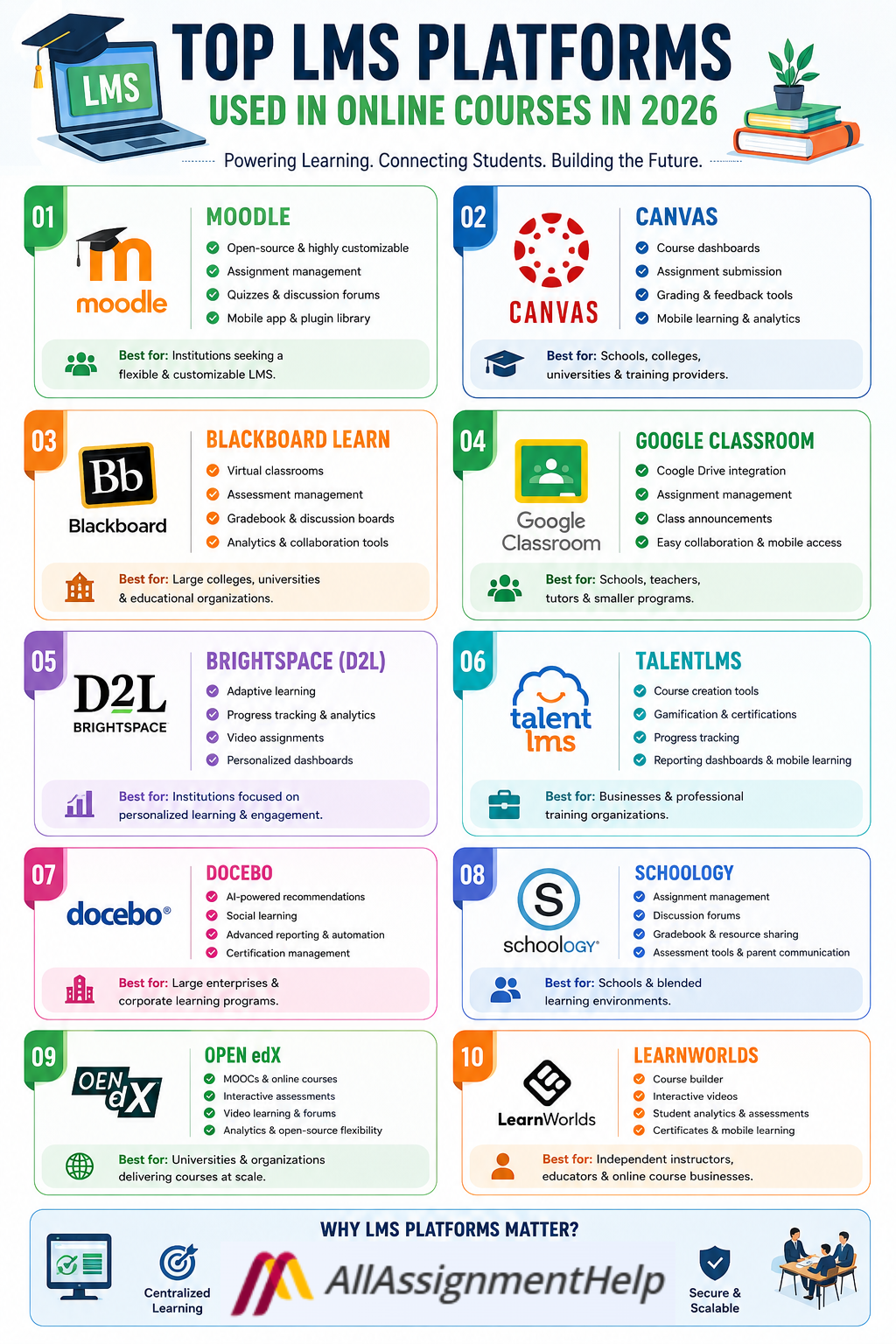
Many LMS platforms are used for online education in 2026. Students should understand how these platforms work because they may encounter one or more of them during their academic journey.
Here are some of the leading LMS platforms:
Moodle
Moodle is an open-source Learning Management System used by educational institutions and organizations worldwide. It is particularly common among:
- Universities
- Colleges
- Schools
- Training organizations
Key Features
- Open-source platform
- Highly customizable
- Discussion forums
- Assignment management
- Online quizzes
- Mobile application
- Extensive plugin library
Advantages
- Flexible configuration
- Strong community support
- Cost-effective
- Suitable for institutions of different sizes
Best For
Schools, universities, and organizations looking for a highly customizable LMS.
Canvas
Canvas is one of the major LMS platforms used by universities, colleges, schools, and other educational organizations. Its clean interface makes it relatively easy for students to navigate their courses.
Key Features
- Course dashboards
- Assignment submission
- SpeedGrader assessment tools
- Mobile learning
- Video integration
- Calendar management
- Learning analytics
Advantages
- Easy to use
- Strong mobile experience
- Fast and intuitive navigation
- Useful collaboration tools
Best For
Schools, colleges, universities, and training providers looking for a user-friendly LMS.
Blackboard Learn
Blackboard has long been a major player in digital education. Many universities and other large educational institutions use Blackboard Learn to manage online and blended learning programs.
Key Features
- Virtual classrooms
- Assessment management
- Gradebook
- Discussion boards
- Learning analytics
- Collaboration tools
- Accessibility features
Advantages
- Robust enterprise features
- Secure assessment options
- Comprehensive reporting
- Suitable for large institutions
Best For
Large educational organizations, colleges, and universities.
Google Classroom
Google Classroom is a popular and easy-to-use platform that integrates with other Google tools and services.
Key Features
- Google Drive integration
- Google Docs collaboration
- Assignment management
- Classroom announcements
- Mobile compatibility
- Easy communication
Advantages
- Simple setup
- User-friendly interface
- Strong collaboration features
- Convenient integration with Google Workspace
Best For
Schools, teachers, tutors, and smaller educational programs.
Brightspace (D2L)
Brightspace is used by colleges, universities, and other educational institutions to support student engagement and online learning.
Key Features
- Adaptive learning
- Learning analytics
- Video assignments
- Progress tracking
- Personalized dashboards
- Mobile access
Advantages
- Strong user experience
- Personalized learning features
- Learning analytics
- Accessibility support
Best For
Educational institutions looking for personalized and data-driven learning experiences.
TalentLMS
TalentLMS is widely used by professional training organizations and businesses for employee training and development.
Key Features
- Course creation tools
- Gamification
- Certifications
- Progress tracking
- Mobile learning
- Reporting dashboards
Advantages
- Quick implementation
- User-friendly interface
- Useful training features
- Suitable for professional development
Best For
Businesses, professional training organizations, and employee development programs.
Docebo
Docebo is an AI-powered enterprise Learning Management System designed primarily for corporate learning and large organizations.
Key Features
- AI-powered recommendations
- Social learning
- Mobile access
- Advanced reporting
- Learning automation
- Certification management
Advantages
- Modern interface
- Personalized learning
- Advanced automation
- Strong scalability
Best For
Large enterprises and organizations with extensive corporate learning and development needs.
Schoology
Schoology combines learning management and collaboration features to support teaching and learning.
Key Features
- Assignment management
- Discussion forums
- Gradebook
- Resource sharing
- Parent communication
- Assessment tools
Advantages
- Strong communication features
- Easy navigation
- Good collaboration tools
- Convenient resource sharing
Best For
Schools and blended learning environments.
Open edX
Open edX is an open-source learning platform that supports large-scale online education. It is used as the foundation for several online learning platforms and can support universities and global education providers.
Key Features
- Massive Open Online Courses (MOOCs)
- Interactive assessments
- Video learning
- Discussion forums
- Learning analytics
- Open-source flexibility
Advantages
- Highly scalable
- Suitable for large groups of learners
- Flexible customization
- Strong developer community
Best For
Universities, large online learning platforms, and organizations delivering courses at scale.
LearnWorlds
LearnWorlds is designed for independent educators, instructors, and online course creators who want to build and deliver digital courses.
Key Features
- Interactive videos
- Course builder
- Student analytics
- Assessments
- Mobile learning
- Certificates
Advantages
- Strong learner experience
- Easy course creation
- Modern design
- Useful tools for online course creators
Best For
Independent instructors, educators, and online course businesses.
How Is AI Revolutionizing the Learning Landscape?
Artificial intelligence is playing an increasingly important role in dDigital learning has also become more advanced with the integration of AI-powered features. These tools can help students access personalized learning experiences while allowing educators to manage different aspects of online education more efficiently.
Some students may struggle to keep up with course materials, assignments, quizzes, and other academic responsibilities, particularly in challenging subjects such as mathematics. When students have difficulty understanding concepts or managing their workload, they may search for additional academic support using terms such as “take my math class.” However, AI-powered features within LMS platforms can provide legitimate support by making learning resources easier to navigate, offering explanations, and helping students identify areas where they need more practice.
Some AI capabilities found in modern LMS platforms include:
- Personalized learning recommendations
- Automated feedback
- Smart revision suggestions
- Predictive learning analytics
- AI chat assistants
- Adaptive learning pathways
These innovations can help personalize online education while making learning more efficient, interactive, and accessible for students.
Benefits of Using an LMS
Learning Management Systems offer several benefits to students, including:
- Flexible learning
- 24/7 access to course materials
- Faster communication
- Better organization
- Easier assignment submission
- Progress monitoring
- Interactive learning experiences
For educators, LMS platforms can simplify course management, assessment, communication, and student progress tracking.
Also Read: Must Have AI Tools for Students
How to Choose the Right LMS?
Choosing the right LMS depends on your learning environment, course requirements, and the features you need. When evaluating an LMS, consider the following factors.
Mobile Accessibility
Many students use smartphones and tablets to access course materials and complete academic tasks.
Choose an LMS that offers a reliable mobile experience if you regularly study on mobile devices.
Assessment Features
An effective LMS should provide assessment tools that support different types of academic activities.
Look for platforms that support:
- Quizzes
- Exams
- Assignment submission
- Automatic grading
- Feedback tools
If you frequently have multiple assignments or writing tasks to manage, understanding how the LMS handles submissions, feedback, and deadlines can also help you stay organized. Students who need additional academic support may also explore coursework writing services for guidance with challenging coursework while continuing to follow their course requirements.
Collaboration Tools
Online learning does not have to be isolated. Collaboration tools can help students communicate with instructors and classmates.
Useful features may include:
- Discussion forums
- Group projects
- Messaging
- Video conferencing
Security
Educational information and student data need to be protected. When evaluating an LMS, consider its security features, data protection measures, access controls, and storage infrastructure.
Also Read: Tech Tools Every Online Student Needs
Future Trends in LMS
The LMS landscape continues to evolve as educational institutions adopt new technologies and learning methods.
Some trends expected to shape the future of Learning Management Systems include:
- Greater AI integration
- Virtual reality classrooms
- Augmented reality learning
- Advanced personalized learning
- Improved mobile experiences
- Voice-assisted learning
- Enhanced learning analytics
These developments could make online education more interactive, personalized, and student-centered.
Final Thoughts
Learning Management Systems have become a foundation of modern online education. They provide students with convenient access to course materials, communication tools, assessments, assignments, and progress-tracking features regardless of their location.
Popular LMS platforms include Moodle, Canvas, Blackboard Learn, Google Classroom, Brightspace, TalentLMS, Docebo, Schoology, Open edX, and LearnWorlds. Each platform offers different features and is designed for different types of educational institutions and learning environments.
Choosing the right LMS depends on the needs of the institution, course structure, instructor requirements, and student experience. As online education continues to evolve in 2026 and beyond, LMS platforms are likely to become more intelligent, personalized, mobile-friendly, and interactive.
For students, learning how to navigate an LMS effectively can make it easier to manage course materials, submit assignments, communicate with instructors, and keep track of academic progress. It can also help students develop valuable digital skills that are increasingly important in today’s technology-driven workplace.
Frequently Asked Questions (FAQs)
1. What is an LMS?
A Learning Management System (LMS) is a digital platform used to manage and deliver online education. Students can use an LMS to access course materials, watch lectures, submit assignments, complete quizzes, communicate with instructors, and track their progress.
2. Which LMS platforms are most popular in 2026?
Some widely used LMS platforms include Moodle, Canvas, Blackboard Learn, Google Classroom, Brightspace, TalentLMS, Docebo, Schoology, Open edX, and LearnWorlds. The best option depends on the institution, course requirements, and intended users.
3. Is Moodle a good LMS for online courses?
Yes. Moodle is a flexible, open-source LMS that can be customized for different educational needs. It is suitable for schools, colleges, universities, and training organizations.
4. What is the difference between Moodle and Canvas?
Moodle is an open-source platform known for its flexibility and customization options, while Canvas is known for its user-friendly interface and straightforward course navigation. The better choice depends on the institution’s requirements and preferences.
5. Is Google Classroom an LMS?
Google Classroom provides many LMS-like functions, including assignment management, announcements, communication, and integration with Google Workspace. It is particularly popular among schools, teachers, and smaller educational programs.
6. How does AI improve LMS platforms?
AI can support LMS platforms through features such as personalized learning recommendations, automated feedback, adaptive learning pathways, AI chat assistants, and learning analytics. These tools can help create more personalized and efficient learning experiences.
7. What features should students look for in an LMS?
Students should look for features such as easy navigation, mobile accessibility, assignment submission, online assessments, discussion forums, notifications, grade tracking, progress dashboards, and reliable access to course materials.
8. Can students access an LMS on a mobile phone?
Many modern LMS platforms offer mobile applications or mobile-friendly interfaces. This allows students to access course materials, check announcements, communicate with instructors, and complete certain learning activities from smartphones and tablets.
9. Which LMS is best for universities?
There is no single LMS that is best for every university. Platforms such as Moodle, Canvas, Blackboard Learn, and Brightspace offer features designed to support larger educational institutions. Universities should compare their features, integrations, accessibility, security, and administrative requirements before choosing a platform.
10. What are the future trends in Learning Management Systems?
Future LMS development is expected to focus on greater AI integration, personalized learning, advanced learning analytics, mobile experiences, virtual and augmented reality, and voice-assisted learning. These technologies could make online education more interactive and personalized.