Table of Contents
In 2026, the lives of students are almost entirely digital. They attend classes online, submit assignments online, pay fees, store notes, apply for internships, and network online through LinkedIn, all online. The emergence of online learning and virtual classrooms provides great opportunities. Students can earn degrees, learn from instructors all over the world, and participate in international e-learning platforms, all from home. But like every cloud has a silver lining, online learning is also not all goodie goodie, as with this convenience comes danger.
Cybersecurity and digital privacy are not just IT concerns; they are a matter of life and death for all students. Careless click, weak password, or public Wi-Fi login can cause hacking of academic records, personal identity, financial data, social media accounts, and online class portals.
This blog by AllAssignmentHelp examines what cybersecurity and digital privacy are, why they are important, how experts help in this scenario, common threats to students and how to stay protected.
So lets get started…
What Is Cybersecurity?
Cybersecurity is the practice of protecting computers, servers, networks, software, and data from digital attacks. These attacks usually try to steal sensitive information, damage systems, or disrupt normal operations.
In simple words, cybersecurity is like a digital security system that keeps your online data and devices safe from hackers and cyber threats.
What are the Types of Cybersecurity
Cybersecurity includes different areas of protection:
- Network Security: Protects computer networks from attackers
- Application Security: Keeps software and apps secure
- Information Security: Protects sensitive data
- Cloud Security: Secures cloud-based systems and data
- Endpoint Security: Protects devices like laptops and smartphones
Students pursuing cybersecurity get the opportunity to learn about various cyber threats and how they can protect systems and data from online intruders. However, having a basic understanding of cybersecurity is essential for everyone who uses smart devices and an internet connection. Studying cybersecurity may seem exciting and is known for offering excellent career opportunities, but it also comes with intensive learning schedules and complex writing tasks. Overwhelmed students should not waste their valuable time and can consider seeking reliable online Cyber Security assignment help to manage their academic workload effectively.
Also Read: Trending CyberSecurity Research Topics | A Complete List
What Is Digital Privacy?
Digital privacy refers to the protection of your personal information and data when you use the internet, digital devices, and online services. It ensures that your sensitive information, such as passwords, messages, bank details, and browsing activity, is not accessed, shared, or misused without your permission.
Understanding cybersecurity and Digital privacy helps to:
- Protect your personal information
- Prevent identity theft
- Keep your financial data safe
- Protect your private conversations
- Maintain your online freedom and safety
Digital privacy simply means your data is secured and not misused or exploited by any company. It also means that hackers cannot steal your identity, and your academic records are private and secured.
In the age of digital education, privacy should be as important a concern as physical document privacy.
Examples of Digital Privacy
Here are some common examples:
- Using passwords to protect accounts
- Keeping your WhatsApp messages private
- Protecting your bank account details
- Controlling who can see your social media profile
- Preventing apps from accessing unnecessary personal data
Why Cybersecurity and Digital Privacy are More Important than Ever for Students
Students now attend virtual classrooms, submit assignments, ycollaborate using shared drives and communicate digitally. These students used to be online all the time and are vulnerable to cyber threats.
Here is why information of Cybersecurity and Digital Privacyis important:
- Grades, certificates and degree records are very valuable for students and if damaged can hamper a student’s career and future
- Tuition, course subscriptions, exam fees, and digital purchases are conducted online; poor security may result in financial fraud.
- Cyberattacks can affect online learning platforms a lot, as they may delete assignments, remove lectures or completely suspend the account.
Cybersecurity is no longer a choice, it is a necessity. There are many situations in a student’s academic life when they may feel overwhelmed or need assistance with their online classes. To manage these challenges, some students turn to online class help or assignment help services, asking, Can you take my online class for me? However, not all of these websites are reliable. Some are created with the sole purpose of fraud and may steal students’ personal information, misuse their data, or even blackmail them.
Students must be cautious and choose only trusted and verified platforms to protect their academic records and personal information.
What are the Common Cyber Threats That Students Face?
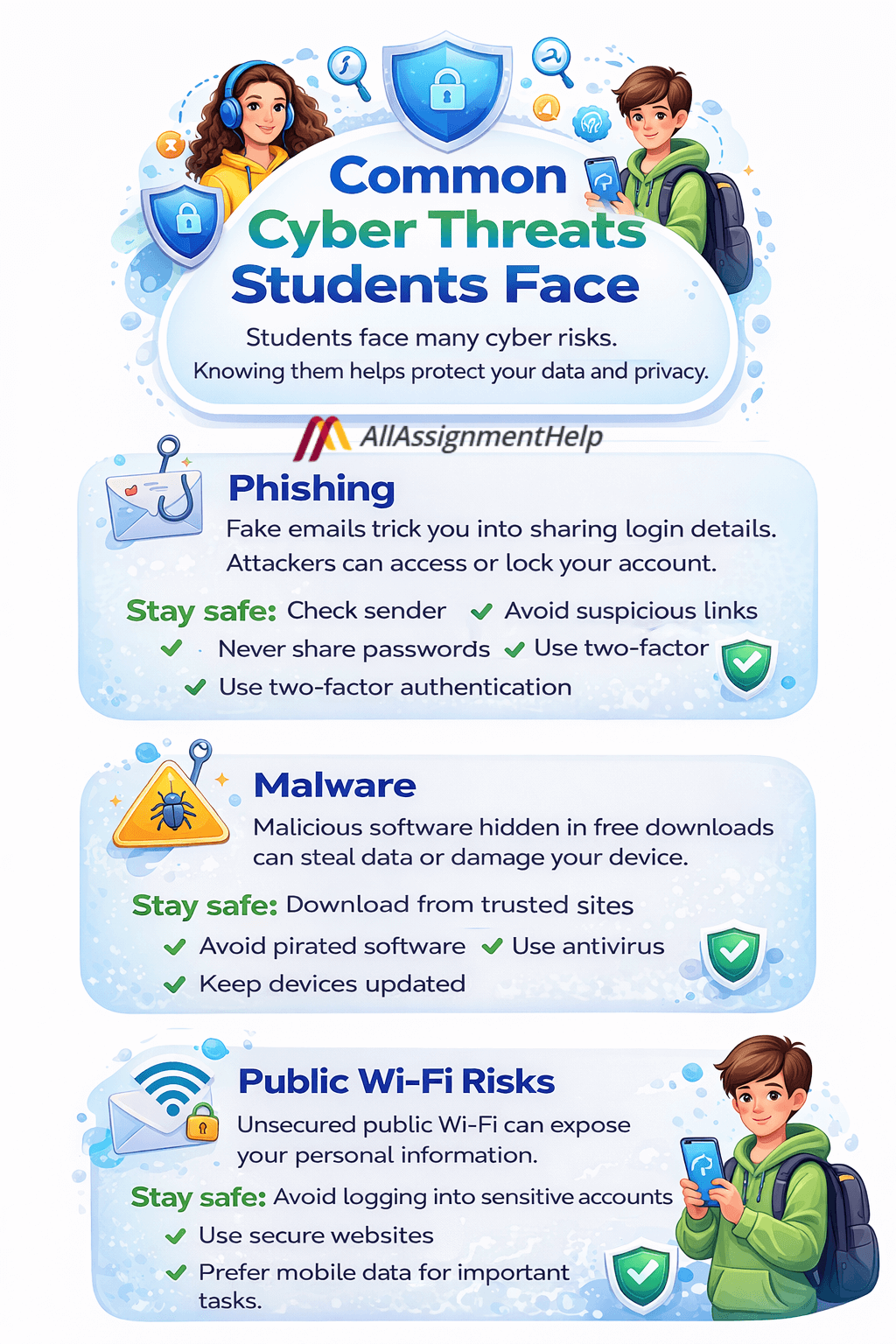
There are many cyber threats that students usually face, and understanding the risks around cybersecurity and digital privacy helps avoid them.
Here are the threats:
Phishing
Imagine receiving an email that looks exactly like it came from your college or online learning platform. It warns you that your account will be suspended unless you verify your details immediately. The message creates urgency, making you feel like you must act fast. Without realizing it, you click the link and enter your login information. This is how phishing works. Attackers design these emails to look real so they can steal your credentials. Once they have access, they can misuse your account or lock you out completely.
How to protect yourself from phishing:
- Always check the sender’s email address carefully before clicking anything.
- Avoid clicking on suspicious links or downloading unknown attachments.
- Never share your passwords through email or messages.
- Look for warning signs like spelling mistakes, strange email domains, or urgent language.
- Use two-factor authentication for your important accounts.
Malware
As a student, it is tempting to download free notes, software, or study materials from unknown websites, especially when deadlines are near. However, these downloads can secretly contain malware. Once installed, malware can monitor your activity, steal passwords, access personal files, and even damage your system. This not only puts your personal data at risk but can also affect your academic work. Losing assignments or personal files can create serious academic and personal stress.
How to protect yourself from malware:
- Download files only from trusted and verified websites.
- Avoid clicking on pop-ups offering free software or study resources.
- Install antivirus software and keep it updated.
- Do not use cracked or pirated software.
- Regularly update your device and applications.
Public Wi-Fi Risks
Public Wi-Fi is convenient, whether you are studying in a cafe, library, or airport. It helps you stay connected when you are on the move. However, these networks are often unsecured, making it easier for attackers to access your personal data. When you log into academic portals, email, or other accounts on public Wi-Fi, your information can be exposed without your knowledge.
How to stay safe on public Wi-Fi:
- Avoid logging into sensitive accounts while using public Wi-Fi.
- Use secure websites that begin with “https”.
- Disconnect from public Wi-Fi when you are not using it.
- Forget the network after use to prevent automatic reconnection.
- Use mobile data or a secure network for important tasks whenever possible.
These are some common threats that students should be aware of in academics if they want to have a secure learning experience, especially when studying online. They should be even more cautious if they are using online assignment help sites for assignments or other academic tasks. Students should only consider reliable and trusted platforms in the industry. Otherwise, they may end up losing their personal information, academic data, and even their money.
Read More: Cybersecurity Tips for Students in the Digital Age
What are the Common Cybersecurity Challenges Faced by Students in Online Learning
While e-learning platforms invest in encryption and protection, user behavior is the greatest risk factor. Students have to be very smart even while they are hiring academic professionals for help. When students go to the internet requesting experts, can I pay someone to take my exam for me? There are chances they may end up getting help from scammers if not well aware and proactively referring to reliable sites only.
There are many fake websites who claim they will help with academics, take money and then vanish. Students have to be very smart while choosing experts and go for realistic websites.
Practical Cybersecurity Habits Every Student Needs to Have
There are many smart ways that work well for students and save them from cyber attacks. If you follow these habits mentioned below, it will help you a lot.
Create Strong Passwords
Avoid using weak passwords such as simple number sequences (123456789), your birthday, or your name. These passwords are easy for attackers to guess. A strong password should include a combination of uppercase and lowercase letters, numbers, and special characters. Using a unique password for each account further improves your security and reduces the risk of multiple accounts being compromised.
Enable Two-Factor Authentication (2FA)
Two-factor authentication adds an extra layer of security to your accounts. Even if someone gets your password, they cannot access your account without the second verification step. Students should enable 2FA on academic portals, email accounts, banking apps, and social media platforms to enhance protection.
Keep Devices Updated
Always keep your devices, software, and applications updated. Updates often include important security patches that fix vulnerabilities. If you ignore updates, your device becomes an easier target for cyber attackers who exploit outdated systems.
Avoid Clicking on Unknown Links
Students often receive links through emails, messages, or social media. Clicking on unknown or suspicious links can expose your device to malware or phishing attacks. Before clicking, hover over the link to check the URL. If the source looks suspicious or unfamiliar, avoid clicking and delete the message immediately.
Use Secure Networks
Avoid logging into academic portals or important accounts while using public Wi-Fi. Public networks are less secure and can expose your personal information. If you must use public Wi-Fi, consider using a secure VPN connection. Whenever possible, use your home network or mobile data for accessing sensitive platforms.
Understand Data Privacy Policies
Many students ignore privacy policies, but they explain how your data is stored, used, and shared. These policies also describe your rights and how long your data is retained. Always choose trusted and verified platforms, especially when making payments or sharing personal information. Avoid suspicious websites that offer services without transparency.
Social Media and the Dangers of Oversharing
Students often unknowingly put their privacy at risk by sharing too much information online. Posting student ID cards, exam hall tickets, certificates, or real-time location updates can expose sensitive details. Cybercriminals can use this information to steal identities or gain unauthorized access. Always review your privacy settings, avoid sharing sensitive documents publicly, and be cautious when accepting friend requests from unknown people.
Cybersecurity as a Career Option
Cybersecurity is one of the fastest-growing career fields in 2026. With increasing cyber threats, organizations need skilled professionals to protect their systems and data. Some popular cybersecurity career roles include:
- Ethical Hacker
- Cybersecurity Analyst
- Data Protection Officer
- Security Engineer
- Digital Forensics Expert
This field offers strong job security, competitive salaries, and excellent career growth opportunities.
Also Read: Data Security and Cyber Threats
Last Thoughts
Cyber incidents can cause financial loss, emotional stress, anxiety, and academic disruption. Lack of awareness and poor security practices can lead to serious consequences, including loss of personal data and academic records. That is why awareness around cybersecurity and digital privacy is essential for every student. By taking simple precautions and staying informed, students can protect their digital identity, academic work, and future.
FAQs
1. What is cybersecurity in simple words?
Cybersecurity is the protection of devices, accounts, and data from hackers, viruses, and online attacks.
2. Why do students need cybersecurity?
Students need cybersecurity to protect their academic accounts, personal data, assignments, and financial information from hackers.
3. What are common cyber threats students face?
Common threats include phishing emails, malware, fake websites, weak passwords, and unsafe public Wi-Fi networks.
4. How can students stay safe online?
Students should use strong passwords, enable two-factor authentication, avoid suspicious links, and use secure networks.
5. Is public Wi-Fi safe for online classes?
Public Wi-Fi is not fully safe. Avoid logging into important accounts on public networks or use a secure connection.