What Students Should Know Before a Proctored Online Exam
What this article will help you understand
This guide explains common online-proctoring models, questions students should ask about data and accessibility, how to rehearse the technical setup and how to document an interruption or automated flag. It treats assessment integrity and student rights as complementary requirements.
- Confirm exactly what the institution records, retains and reviews.
- Test the approved device, browser, network and accessibility setup in advance.
- Keep a factual record of technical interruptions and support contacts.
- Automated alerts require context and fair human review rather than automatic guilt.
What are you trying to do with this topic?
Choose the closest task and the page will point you towards a useful next step.
Start with the central concept and the terminology used in the article.
Open the closest route ↗Connect the explanation to the question, learning outcomes and marking criteria.
Open the closest route ↗Review evidence, structure, referencing and the exact submission requirements.
Open the closest route ↗Do you have enough information to begin?
Select what you already have. Nothing is submitted from this checklist.
When these details are together, the requirement can be reviewed in context.
Assignment Help USA ↗Table of Contents
Online proctoring can feel intrusive when students do not know what the software records or how the session will operate. The most useful preparation is not trying to “beat” the system. It is understanding the institution’s rules, checking the technology early, and knowing what to do when an automated alert does not reflect misconduct. This blog by AllAssignmentHelp will guide you through different aspects of online proctored exams, starting with what they are, how proctored online tests operate, and the different factors an institution considers when choosing a digital testing platform for proctored online exams.
What is an Online Proctored Exam?
This type of online exam allows instructors to keep an eye on students’ actions while they are taking the exam virtually. Thus, the online proctored tests, which are equipped with AI-powered exam proctoring software, track and monitor students and assist educational institutions in doing away with exam cheating.
Read more: 10 Effective Exam Preparation Tips To Boost Your Performance
Different Types of Online Proctored Exams
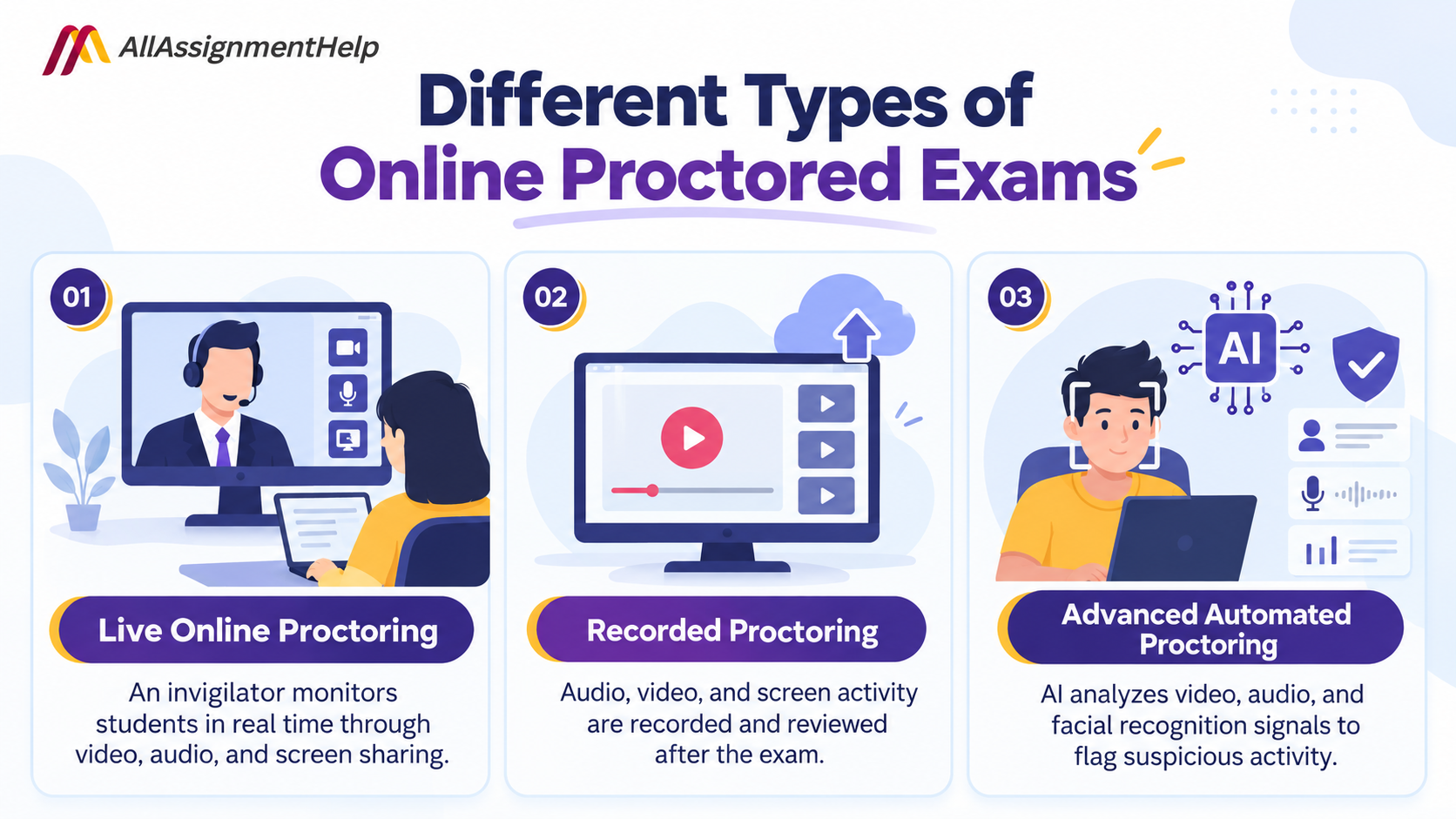
There are various types of online proctoring exams that students experience as they advance in their higher studies.
Take a look at the types below:
Live online proctoring
During a live proctored exam, the applicants are observed online by an invigilator using real-time screen sharing, audio, and video feeds. The purpose of the invigilator’s training is to authenticate students and detect any questionable behavior.
At a time, instructors/professors can keep an eye on 16–32 individuals. But just like an offline exam, this proctoring system necessitates human participation.
Recorded proctoring
There is no human surveillance involved in the recorded proctoring process. Rather, recordings are made of the candidates’ screens, audio, and video.
The facilitator may watch this at a faster pace at a later time to review any questionable activity. Although scheduling is no longer necessary, proctoring after tests are taken online still needs human intervention.
Advanced automated proctoring
The audio, video, and screen sharing are captured when the test is being administered in automated proctoring. The software employs biometric facial recognition for proctoring and listens for suspicious activity in videos and background noise. With the use of modern video and audio analytics, it keeps an eye on the student and looks for any misbehavior. Proctoring doesn’t require human intervention or scheduling.
How Does Online Proctoring Software Work?
Online proctoring software follows several steps to verify students, monitor exams, and help prevent cheating.
Here are the main steps involved in using online proctoring software:
Online Registration Is a Must for Candidates
Students must register online by providing personal information, including their name, address, class, academic year, and other details required by the online proctored examination software.
Verification Before Moving Forward
After registration, students receive an ID and password to access the exam. The online assessment tool verifies these credentials and may send an OTP for confirmation. Once video proctoring with real-time monitoring authentication is complete, students can begin the exam.
Evaluation Meeting and Observation
Students receive instructions based on their exam type, such as semester, annual, or entrance exams. Once the test begins, teachers can monitor students throughout the examination.
Turning Off Additional Browsers
To prevent cheating, online proctored exam software may disable additional browsers and restrict access to unauthorized resources.
Randomly Taking Pictures and Watching Videos
Online proctoring software may capture random photos and send screenshots to faculty. Teachers can also monitor students through webcams and review recordings, depending on the software’s features.
The functionality depends on the proctoring software used. Unlike traditional examinations, faculty members do not need to move between rooms for invigilation. Reliable online proctored software can support roll list creation, exam proctoring, online student attendance, and prevent cheating in online exams.
Having trouble preparing for your online History exam? Don’t panic. You can seek expert assistance to manage your exam while focusing on upcoming classes. Even if your college uses online proctoring software, check the institution’s rules before seeking help.
If you lack confidence in your online History class, search for do my online History class to explore subject-specific tutoring and academic support. Choose a reliable provider that suits your needs and get help from experienced experts.
Read more: Online Exam Fear: How to Stay Focused and Confident?
What online exam proctoring can involve
Institutions use different combinations of identity verification, browser controls, video supervision and post-exam review. A live proctor may observe the session in real time, while a record-and-review system may flag events for a person to assess later. Some platforms restrict other applications; others require a room scan or verify identity before the assessment begins.
For the wider question of AI rules and assessment design, see the guide to online assessment authenticity.
Students should not assume that every product works in the same way. The course handbook, privacy notice and exam instructions are the authoritative sources for a particular assessment.
Live, recorded, and automated systems are not identical
An online proctored exam session places a person on the other end of the connection. A record-and-review system captures specified activity for later examination. Automated systems may identify events according to programmed rules and send them for review.
The practical difference affects whom a student can contact during the session, what evidence is created and how quickly an incident can be resolved. The institution should explain which model is being used rather than relying on the general label “online proctoring.”
What students should confirm before accepting a proctored exam
- Which device, browser and operating-system versions are supported?
- Will video, audio, screen activity or identification documents be recorded?
- How long will recordings and personal data be retained?
- Who can review an automated flag?
- What accommodations or alternative arrangements are available?
- How should a technical interruption be reported?
Privacy and accessibility questions are legitimate. Remote supervision can affect students with limited bandwidth, shared living arrangements, disabilities, religious requirements or equipment that does not meet the platform specification. Raise these issues before the exam rather than waiting for the test window to open.
Prepare the room without overcomplicating it
Use a stable surface, adequate lighting and a position that keeps your face visible if video is required. Remove prohibited notes, devices and headphones. Tell other people in the household when the session begins and ends. If a blank sheet or calculator is allowed, keep the written permission or assessment rules available.
Avoid unnecessary changes once verification has started. Leaving the camera frame, switching networks or repeatedly looking away may generate a flag even when there is an innocent explanation.
Run the technical rehearsal early
Complete the institution’s system check on the same device, network and location planned for the exam. Test the camera, microphone, browser permissions, power supply and available storage. Install required software from the link supplied by the institution rather than from an advertisement or third-party download page.
If secure-browser software conflicts with accessibility tools or antivirus settings, capture the error and contact the official support channel. Do not disable protections or accessibility features without authorised guidance.
What to do when technology fails during an online proctored exam
- Stay calm and note the time.
- Use the platform’s support function or the institution’s stated emergency route.
- Take a screenshot or photograph of the error if the rules allow it.
- Record the ticket number, support response and time service resumed.
- Email the instructor or examination office as soon as permitted.
A clear incident record is more persuasive than a general statement that the system “did not work.” It helps staff distinguish a genuine interruption from an incomplete submission.
Automated flags should not be treated as automatic guilt
Eye movement, background sound or a temporary face-detection failure can have several explanations. Fair processes should allow contextual and human review. If contacted about an alert, respond factually: explain what happened, provide the support record and refer to any approved accommodation.
Students who are struggling with course organization should seek legitimate tutoring, revision or planning help before the assessment. The purpose of online class help should be to assist a learner prepare and keep up with permitted coursework, never to evade identity checks or institutional rules.
Questions that institutions should answer clearly
Good exam design includes transparent instructions, an accessible practice route, minimal necessary data collection, an appeal process and a backup assessment plan. Institutions should also explain why proctoring is proportionate to the assessment instead of treating surveillance as the default for every quiz.
Accessibility and privacy questions deserve an early answer
A standard technical checklist does not work for every student. Screen readers, speech-to-text software, additional monitors, medical devices, movement breaks or another person providing approved assistance may trigger restrictions or automated observations. Students with an accommodation should contact the disability or examination office before the test and obtain written confirmation of the approved setup. The practice session should use the same accessibility tools wherever possible.
Privacy questions are also practical, not merely theoretical. Before installing software, identify what it can access, whether a browser extension remains active after the exam, where recordings are stored, how long information is retained and how a student can request correction or deletion where applicable. A room scan can expose family members, personal documents or features of a private home, so students should be told what must be visible and whether a neutral alternative location is available.
If the required system conflicts with an accommodation, device limitation or reasonable privacy concern, raise the issue before accepting the assessment conditions. The useful outcome is a documented alternative agreed by the institution, not a last-minute attempt to work around the software.
What Are the Do’s and Don’ts of An Online Proctored Exam?
Exams that are proctored online are now common. Online proctored exams have been implemented by numerous institutions to examine and assess students both during and after the pandemic.
The following Dos andDon’ts must be adhered to by the institutes to properly benefit from online exams:
Do’s
- Make sure the room where the online exam will be administered has enough illumination.
- Ensure the candidate spends the exam alone in the room.
- Make sure there aren’t any technical problems in advance.
- A microphone and an internal or external webcam are necessities for the learner.
- Make sure the background is uncluttered and noise-free.
- Verify that there are no power outages and strong internet access.
- For rough work, one must carry additional sheets.
- Provide students with precise instructions that will support them during the entire exam.
- Verify that there are no electronics in your immediate vicinity.
- For better performance in an online proctored exam, take practice exams.
Don’ts
- Students must remain within the webcam’s viewing area.
- They must not wear masks over their faces.
- Students must refrain from attempting to browse the exam screen.
- As invigilators have eyes on them students must not to use any means of screen sharing or question sharing with other people.
- During the exam, students are not allowed to speak to anyone.
- Students must not use more than one device at once as it is against the law and should be avoided.
- Applicants must abstain from food and drink throughout the test.
- Students must not leave the exam room before the allotted time.
- For online tests, students must use a safe browser.
- Exam retakes should only be allowed in the event of a technical problem and with the instructor’s approval from concerned authorities.
Students must keep a note of all these pointers before appearing any online exam or classes. Not to worry, even if a virtual eye is observing you! If you need help with your online English class as you have another important work to attend, rather than thinking Who can do my online English class, search using the same words on your search engine. You can find genuine services offering online English class service in your region 24*7. Take advantage of any of these and get all your work done.
Proctored Online Exam: Factors To Consider When Selecting a Digital Testing Platform
There are different factors that are taken into consideration when any institute or organization finalizes an online proctoring exam software.
Let’s take a quick look at the major factors below:
Provide comfort to users
Make sure the proctoring service you select has an intuitive interface that is easy to use. It ought to be tailored to the needs of the instructors and pupils so that they can concentrate on developing and finishing the test.
The capability
If more students are present in a certain exam, the proctoring service should be scalable as well. The scalability of the proctoring service is crucial because an institution or even an organization may have varying numbers of students taking different exams.
Type of test
Before selecting a proctoring service, it is crucial to take into account the kinds of tests that the university administers. For example, the exam may be objective, subjective, open-book, closed-book, etc. In these situations, the proctoring service ought to be adaptable to meet the requirements of different kinds of exams. As a result, the institutions must determine the kind of tests they will need to administer and select the proctoring service that best suits their requirements.
The price of using remote proctoring services
The institution must also assess its budget and the expenses related to a proctoring service. Since proctoring is a one-time expense, it is preferable to invest in a service that guarantees integrity and security.
Technical assistance
Before assessing any proctoring service, it’s important to take into account the support that it provides. During the online proctoring procedure, teachers and students may encounter difficulties. These should be quickly resolved.
Along with these, a few minor aspects are also being assessed by institutes and organizations before finalizing any online exam proctoring software.
Read more: Best Way to Secure High Grades in Online Exams
Frequently asked questions
Can a proctored exam record my room?
Some systems require a room scan or continuous video, while others do not. Read the institution’s notice to learn exactly what is collected and contact its privacy or accessibility office if the requirement creates a concern.
What happens if my internet disconnects?
Procedures differ. Some platforms save progress and allow reconnection; others require staff intervention. Use the official incident procedure and retain evidence of the outage.
Can I use a second screen?
Only when the exam rules expressly permit it. Disconnect additional displays before the session when they are prohibited.
Final thought
Successful preparation for a proctored exam is mostly procedural: understand the data practices, test the approved setup, prepare the room, and know the escalation route. Clear rules protect both assessment integrity and the student taking the test.
What this article covers
This article provides general preparation, privacy and troubleshooting guidance for remotely proctored assessments. It does not describe how to evade monitoring and does not replace the institution's exam rules, privacy notice or accommodations process.
Terms used in this guide
- Online proctoring
- Remote supervision or review used to support the integrity of an online assessment.
- Identity verification
- A process used to confirm that a test taker is the registered candidate.
- Automated flag
- A software-generated indication that an event may require human review.
- Secure browser
- Software that limits specified device functions during an assessment.
Sources consulted for this guide
- Online Proctoring Tools: A Discussion of Privacy, Accessibility, and Appropriate UseEDUCAUSE · October 27, 2021

Vyad
- Next review
- July 8, 2027
What changed: Reframed the article around transparent student preparation, privacy, accessibility and incident documentation instead of surveillance marketing.
Connect the explanation to the work your course actually requires
Use this guide beside the exact brief, course material and marking criteria for Beyond the Basics Innovative Approaches to Exam Proctoring.
- Read the complete brief.
- Identify the expected academic output.
- Follow the marking criteria and source rules.
- Check the final structure and referencing.
Earl Anderson
Artificial Intelligence · 5.0/5
Artificial intelligence tutor whose established profile includes MATLAB and machine learning.
View established tutor profile ↗Relevant subject areas
- Artificial Intelligence
- Machine Learning
- MATLAB
Find another explanation across the complete blog
This search uses WordPress itself, so it can reach articles beyond the 20 shown on the dashboard.
Connect Beyond the Basics Innovative Approaches to Exam Proctoring to the task in front of you
Keep the brief, marking criteria, required evidence and submission format visible while you work.